How to make next-gen ChatGPT work for you
Turn your ChatGPT prop plane into a fighter jet with GPT Work


Gregg Bayes-Brown | 16 July 2026
Back during the Anthropic/DoW crisis, I said OpenAI had fallen to the dark side.
My piece did not inspire Sam Altman’s redemption arc where he threw Satya Nadella down a reactor shaft only to return shimmering blue ghost. Instead, we got this:

It’s been a week, and I am strongly considering leaving my blue lightsabre behind.
GPT 5.6 Sol is, for want of a better term, OpenAI’s Death Star. While not quite on the level of Fable, it nonetheless represents a massive jump in capability at a fraction of the cost of Anthropic’s own flagship.
What really stands out here though is the harness the new model comes with: ChatGPT Work. The harness is the equivalent to Claude Cowork in capability, able to carry out work consistently and to a high quality on behalf of the user. As with Cowork though, GPT Work requires a fair bit of setup to get the intended results – and that’s exactly what we’re laying out for you today.
Want to do your end of a month by a lake? How about turn that client conversation you just had into a MoU instantly? Or embrace agents without being a full signed up member of the nerd squad?
You’re in the right place.
By the end of this guide, you will have GPT Work configured around your own context, connected to the tools you use, and ready to complete a genuine piece of work.
What is GPT Work?
Super quick primer for those who haven’t read my previous articles regarding harnesses. Models (GPT 5.6, Fable 5, Gemini 3.1 etc) are brains. The type of AI you’ve likely been speaking to through chatbots, Apps, are like a head – can see, hear, speak etc. Harnesses are the rest of the body.
GPT Work is the everyday-work version of the same agentic harness underpinning Codex, OAI’s coding harness. Rather than responding once and waiting for another prompt, it can plan, use tools, work with files, retrieve information, create finished deliverables, ask questions, run code, delegate parts of a task and keep going until it reaches a defined outcome. It does all of this while building persistent memory and context files which make the harness bespoke to you.
If 2025 agentic thinking was a robot replacing your process, the 2026 architecture is a mech suit: human judgement at the centre, machine intelligence extending its reach. GPT Work is the most complete attempt I have seen to make that mech accessible to ordinary knowledge workers.
Step one: give it a home
First things first, get the desktop app. This is the first non-negotiable for either GPT Work or Cowork on Claude. If you are using your AI through a browser, you’re using it wrong.
Once installed, your first job is to give it somewhere to work and enough information to understand what good looks like.
Next, we’re going to add a local project pointing at a dedicated folder. Create one at C:\Users\[USER]\[YOUR FOLDER], then add the following folders (don’t worry about files right off the bat, just the folders):
- About - information about you, your organisation, your goals, your audience, your brand and how you think.
- Sources - evidence, research, notes and source-of-truth documents Work may draw from.
- Projects – this is where all your project folders will go. You can create a project in ChatGPT – create the folder for it here and link the two.
- Templates - structures you want repeated: reports, briefs, agendas, decks, trackers and so on.
- Examples - finished work which demonstrates the quality, voice and decisions you expect.
- Workflows - documented processes for recurring work.
- Outputs - where completed work should go. Keep your source material read-only in practice, even when the system technically has permission to edit it.
Don’t agonise and reach for perfect. Part of using AI is ‘good enough’ until you need to rebuild it.
Step two: give it a brain
Many users have coasted through the chatbot era without instructions and wonder why they get awful results. Remember kids: 99 times out of a 100, the problem with your AI outputs is you.
Now, instructions are another non-negotiable.
Use them to make your experience bespoke: language details, how much detail you want, whether it should challenge your assumptions, how it should ask questions and how you prefer to collaborate. I trained mine to swear because I’m an incredibly mature 41 year old.
Inside each project, there’s specific instructions. This is where you define purpose, audience, sources of truth, permissions, output conventions and review requirements.
For a local project, an AGENTS.md file (CLAUDE.md on Anthropic, and make one of each if you plan on using both) provides durable written guidance that Work and Codex can read from the folder. Think of it as the operating manual for that environment: what to read first, where outputs belong, what must never be changed, how work should be verified, and when the system must stop for your approval.
If you do not know what to write, do not stare at a blank settings box like it has insulted your family. Ask Work to interview you:
I want to create instructions which define how we work together. Interview me one question at a time about my role, goals, working style, quality standards, recurring tasks, sources of truth, boundaries and approval points. Challenge vague answers. When you have enough information, draft global instructions and separate project instructions, explaining what belongs in each.
Step three: give it hands
One of the reasons I reject the terminology of ‘tool’ when describing AI is because AI itself uses tools, particularly in the harness era.
Plugins (skills on Anthropic) can add reusable skills while connections to services such as Gmail, Google Drive, calendars, Slack, SharePoint, GitHub and other systems. You can create your own plugins (just ask ChatGPT) and turn your workflows into a documented process Work can follow. Then just tell Chat to do it (ie. ‘Invoice client X for £Y’ is all you need to say). There’s also pre-made ones to install – check the plugins marketplace.
Meanwhile, connectors allow you to sync to other apps effortlessly. Want GPT to track its tasks? Connect Asana. Want to describe an idea and get the map laid out? Connect Miro. Want it to find that report from six months back? Connect Onedrive/Gdrive. A quick note: don’t connect everything all at once. Every connection expands what the system can see and potentially act upon. Begin with the smallest useful set, understand the permissions, and add more when a genuine workflow requires them.
Step four: give it work
Another common mistake many make in AI is perceiving it as a product play – hence the tsunami of apps no one will ever use plaguing app stores. In truth, it rewards the strategic mindset. You don’t use AI to build product, you use it to elevate yourself and create more value around the things you already excel at.
To do that, we split our use cases between efficiency (product) and effectiveness (strategy). Efficiency use cases remove low-value effort – stuff which you can offload without it being detrimental to you. Effectiveness use cases let you attempt work which was previously too difficult, expensive or slow. The north star of the pair is effectiveness: not merely doing the old thing faster, but changing the impact and ambition of the work.
Once your project has some context, ask:
Read the project instructions and available sources. Help me identify useful GPT Work applications across my role [ROLE] at [ORG]. Separate them into: (1) efficiency — reducing low-value effort; (2) effectiveness — improving decisions, quality or outcomes; and (3) new capability — work I could not realistically do before. Ask me one question at a time and flag where important context is missing. Rank the final list by likely value, risk, required access and difficulty.
Here’s the next non-negotiable. No one goes into the gym, performs a single bicep curl, and comes out looking like Arnie. AI’s the same. It requires reps. Reps, reps, reps. So we’re going to pick one from that list: A weekly briefing, meeting prep, turning customer research into a deck. Nothing too fancy. Then we’re going to build it. Then tomorrow, we’ll do it again.
Eat, sleep, build, repeat.
Building with ChatGPT
All this talk of building stuff might have you thinking “I’m not technical, I can’t do this”.
Yes, you can.
Technical vs non-technical is dead. You know who outperforms coders and engineers at agentic coding? Managers and leaders (Anthropic research). You know who’s behind the devs by a single percentage point? Lawyers.
It is now practitioner vs non-practitioner, and we don’t get to be a practitioner without practice.
For a first attempt, choose a deliverable you understand well enough to judge. The example below turns a set of source materials into a blog. Replace the bracketed sections and attach or point Work towards the relevant files:
Create a blog on [TOPIC] for [AUDIENCE]. Use only the attached files and the sources in this project unless you ask permission to search elsewhere. First inspect the materials and tell me what you can and cannot access. Then propose a short plan and ask any essential questions one at a time. Once I approve the plan, analyse the evidence, identify contradictions and gaps, and create a polished [WORD/PDF/DECK] in the Outputs folder. Before finishing, verify every major claim against the sources, inspect the complete file for factual and visual errors, and report your assumptions, unresolved gaps and checks performed.
If you’re ever overwhelmed, stop. Ask Chat to explain things to you. Use it as an opportunity to take a beat and learn. The point is not to achieve maximum agentic magnificence on day one.
Where this leads
Less than a week into using Sol, and the rabbit hole I fell in already needs planning permission for rapid expansion.
Last year, I began designing a modular agentic system called GLaDOS: a durable extension of my mind, with separate personal, professional and knowledge memory; specialist agents; shared context; routing; evidence; governance; and interfaces across the tools I use.
Along the way, I got distracted by things like making money and the project has laid dormant for the past couple of months.
Now, I’m rebuilding it at pace – largely while remote and walking in the woods.
GLaDOS has therefore evolved into Odin.
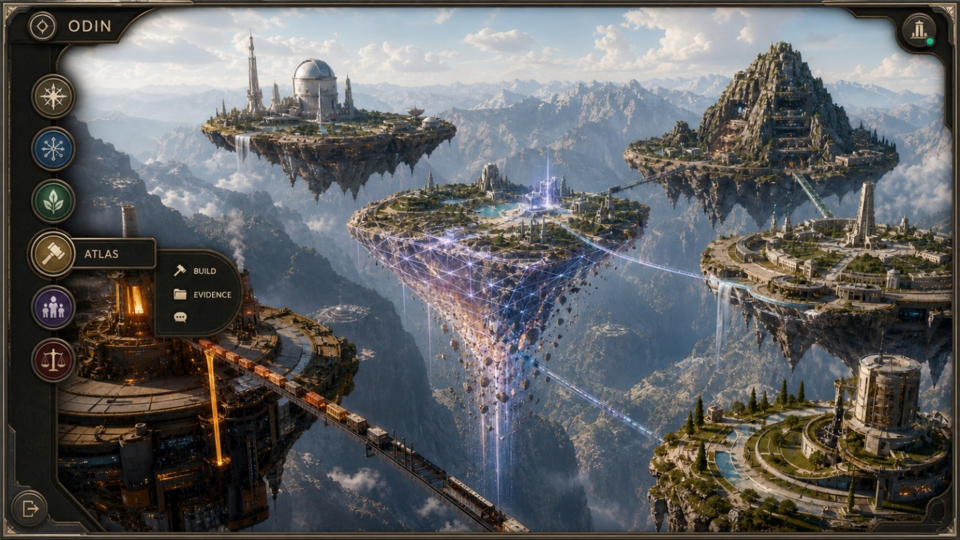
Odin is a coordinating intelligence sat across distinct domains (Kronos – time and project management, Font – writing and comms support, Stratus – strategy etc) which work together to allow me to focus on the parts of my work I am most drawn to and give me a sense of purpose and challenge.
I plan to release Odin as open source. This is not an act of commercial self-harm because the software is not the strategy.
Anyone will be able to make their own Odin and customise it to their needs. What they cannot copy from a repository is me.
You can clone the mech. You cannot clone the pilot.
That is the wider lesson of GPT Work. The value comes from the strategy, context and human capability wrapped around it.
The product isn’t what you make; the product is you.
And finally…
OpenAI has not resolved the ethical questions surrounding its leadership, incentives or direction. Sol and GPT Work do not erase them. That said, they do require some intellectual honesty from me in acknowledging that these are remarkable offerings from OAI. They represent extraordinary technical progress and a meaningful move towards AI which augments people instead of merely generating content at them.
Where you draw the line is your decision. Mine remains as it was in Nov 2022: game theory – I always pull the lever.
Start with one use case. Give it useful context. Make connections which feed it and expand its usefulness. Commission one real outcome. Review it, break it, rebuild it. Then take what worked and make it repeatable.
Product was never the prize. Empower the strategy.
Thanks for reading! If you’ve been using the new model/harness and have tips to share, sound off in the comments.