AI Bayesics #5: Context
Does your AI read between the lines?


Back in AI Bayesics #2, I gave you a framework for writing prompts.
Confession: I don’t use it.
I knew that while I was writing the piece. There’s a draft on my hard drive where I introduce the framework and then tell you to forget about it, because the way you work with AI in 2026 looks nothing like filling in a template.
Most of my interactions are rambling, open-ended conversations with a rough goal in mind. No prescriptive instructions, no careful scaffolding. Just a back and forth with something that already knows me, my business, and whatever I’m trying to build.
The difference is context.
What context actually is
Context is what changes AI from “stoned temp with a bad attitude” to “AI gets me, man”.
Imagine a new hire walks in and you say “write me the new GTM deck.”
They may not show it, but internally, they are having a panic attack. They don’t know who the audience is, where the corporate template is, or what words we banned last January because legal kicked off. They’re missing the missing context.
AI is the same. It has a broad range of knowledge at its disposal, but that doesn’t mean it knows what you need it to know.
It doesn’t know your boss is allergic to emojis. It lives in blissful ignorance of Gary’s comedy tie collection. But it likes to pretend it does, and will confidently fill a context vacuum with its own thoughts on the matter.
To counter that, we provide context.
The easiest context to add is stuff you already have lying around.
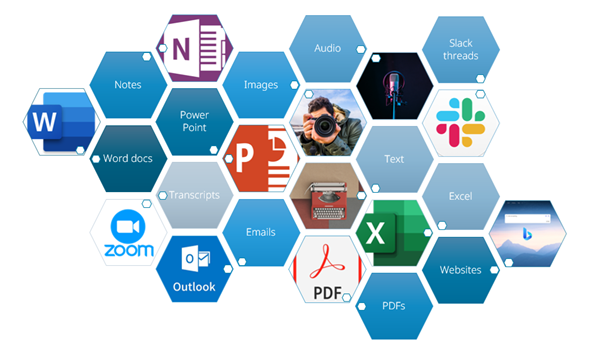
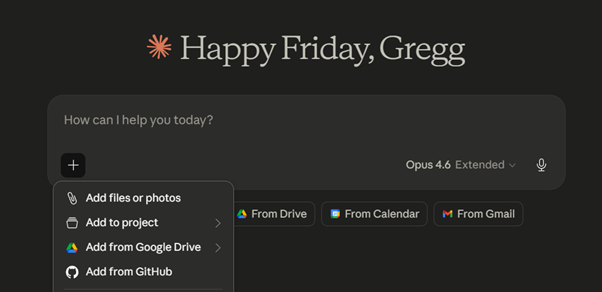
Your boss has sent edits on a document you’re working on — that email is context. You’re blogging about a paper you read — the paper is context. You’re writing up an MoU from a meeting this morning — a photo of your handwritten notes is context. Most modern tools will swallow PDFs, Word docs, images, spreadsheets, transcripts, and photos of scribbles taken in bad lighting. You can copy and paste, drag and drop, or click the + on the prompt window.
A key thing to keep in mind: crap context files creates crap outputs. Chucking a bunch of documents you haven’t read which are full of errors at your AI is unlikely to get you the results you want.
Making your own context
Pre-existing files get you a long way. It shifts gear when you start writing context files on purpose.
First, a crash course in markdown files. Markdown files use the eponymous lightweight formatting language. It’s plain text with a handful of simple conventions — # for headings, * for emphasis, - for lists — that both humans and machines can read easily. As a result, .md files are used widely as context files.
Open Notepad, write as normal, save with a .md extension. That’s it. No special software, no learning curve, nothing to pay for.
Start with an about.md. This is where AI learns who you are:
I want to make an about.md context file you can use in our future interactions. Interview me about everything you need to know to effectively collaborate with me.
Let it ask questions. Answer properly. Get it to write the file, then attach that file to future chats. Now AI knows your role, your preferences, your non-negotiables (British English, no emojis, stop apologising, whatever), and how you like to be challenged. It stops guessing.
The same move works for anything you find yourself repeating. A style-guide.md for how you write. A my-org.md for how your company works. A stakeholders.md for the cast of characters. A brand-guide.md for tone of voice. Each file is a piece of your world the AI no longer has to reinvent from scratch every time the chat window opens.
Knowledge base
Do this enough times and you’ve accidentally built a knowledge base.
That’s the quiet compounding effect of context engineering. Every file you write is an investment. Eventually you’ve got a folder of documents that describe your world — who you are, what you do, who you work with, what you’ve already decided, what you’re trying to build — and any AI you point at it catches up in seconds.
This becomes load-bearing the moment you graduate from chat windows to proper agent harnesses like Cowork, Claude Code, Codex, or OpenClaw. These tools let AI actually do things — edit files, run code, ship work — and you do not want an AI with write access to your project rummaging around without a briefing.
Remember all those mean things you said a few months ago? Skynet remembers.
To avoid the AI SSD Apocalypse, you want a claude.md (or agents.md, depending on which harness you’re running). It tells the agent what you’re building, which folders are read-only, where outputs should go, the build process, and every gotcha you’ve painfully discovered.
With it, you’ve got a collaborator. Without, you’ve got a problem.
Context windows
One last thing: more is not always better.
Every model has a context window, ie. the total amount of information it can hold in working memory for a given conversation. Modern frontier models have enormous ones, sometimes running into millions of tokens, so you’d think you could throw everything at the wall and let the AI sort the rest out.
You can. You shouldn’t.
There’s a phenomenon called context rot: the larger and messier the context, the worse the model performs at actually using any of it.
Load deliberately. Bring what’s relevant to this task and leave everything else on the shelf. When a conversation drags on and AI starts losing the plot, start a fresh one with only the files that matter.
We’ll be covering this as we continue our building workflow next week with research (check AIB #4 for the first part: brainstorming).
Reps for this week: make context files. The sailing gets much smoother from here.
Thanks for reading. If you found this piece useful, please feel free to share with your friends and professional contacts. AI Bayesics publishes every Friday on the Bayesian Theory Substack and is available to free subscribers.